IMG 1 of 0
No Longer Available

Part Number:
115295
(?) Brand:
Manuf No:
BXSTS100A
Shipping Weight:
2 KG (Includes product packaging)
Estimate Shipping
All stock codes associated to this product
BXSTS100A, CAIBXSTS100A, CAI-BXSTS100A, 735858205139, 5032037009096
Quick reference guide
Intel Thermal Solution STS100 Series
for Intel Xeon processors in server/workstation systems featuring two LGA1366 sockets
Product name   Intel Thermal Solution STS100A  
       
Description   Active heat sink with fixed fan  
Recommended usage2


Pedestal chassis that provides ventilation and correct temperature air to heat sink  
Maximum CPU TDP   80W  
Boxed product code   BXSTS100A  
2Contact your chassis supplier for compatibility details.
 
Intel Xeon Processor 5000 Series
Thermal solution installation procedures for Intel Xeon processors 5500 series
 

These instructions are intended for the Intel Server Thermal Solutions for use with the Intel Xeon processor 5500 series in the LGA1366 form factor.

Careful attention is required when installing the Boxed Intel Server Thermal Solution. Follow these precautions to help avoid potential damage to the thermal solution, server board and or processor back plate.

These careful instruction are intended for all three version of the Intel Server Thermal Solution, STS100A, STS100P, and STS100C. Image below is the STS100C, follow the same screw installation order for the STS100A and STS100P.

There is a short video from Intel's Tech Show that demonstrates these instructions.

Thermal Solution Installation Procedure:

  1. With one hand, align and apply downward pressure to the top of thermal solution for steps 2-4.
  2. Use a screw driver in the other hand to start one screw. Engage screwthreads two rotations and stop. (Do not fully tighten)
  3. Go to the screw at the opposite corner (see image below). Engage screw threads two rotations and stop.
  4. Engage remaining screws two rotations and stop.
  5. Repeat steps 2-4 (two rotations each screw) until all screws are lightly tightened. (8 inch lbs maximum torque)

For removal: Loosen the screws (two rotations each screw), proceeding to opposite corners until all the screws are loosened.
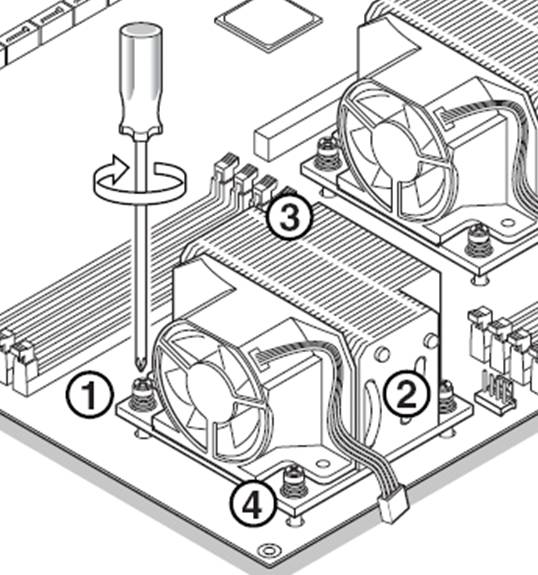

Image

It is not necessary to complete tighten these screws down. The tension spring associated with each screw will help ensure secure and adequate pressure on the processor's heat spreader surface.

Note Failure to follow these steps can result in one or more screws being over tightened too early, causing stress or cross threading of the other screws. Follow the steps above, and do not tighten beyond 8 inch pounds to avoid issues.

Note Torque specification used in this article is inch pounds, not foot pounds. 8 inch pounds is equal to 0.67 foot pounds, or 0.092 kilograms (force) per meter. Do not exceed the maximum torque of 8 inch pound

No additional files, specification sheets, guides or documentation found for product.

Warranty: 3-year Manufact.

Full manufacturers warranty details are available at the manufacturers (Intel) web site.

Unless otherwise specified Techbuy is normally your first point of contact for warranty related returns, further information regarding our warranty policies and consumer guarantees is available on our policies and service & support pages.

To apply for return of a product just go to our returns page.

These terms are in addition to and do not affect any terms, conditions, guarantees and warranties implied by law.

Visitor Reviews

[ There are no visitor reviews for this product yet]

Review Product

No related products found.

 
L7: 1 | TM: 0 | LM: 1 | TY: 2 | T: 4026
We accept the following with No surcharge on VISA, Mastercard and Paypal!
� Techbuy Pty Ltd 2000 - 2026 All rights reserved.
All prices shown on techbuy.com.au are in $AUD and inclusive of GST. Prices and availability are subject to change without prior notice. Images displayed are accurate to the best of our knowledge and we will not be held responsible for purchases based soley on these images. All brands and names are trademarks of their respective companies. Shipping Australia wide to all metro and regional areas (Sydney, Melbourne, Brisbane, Adelaide, Perth) and Internationally. For more information, please see our usage policies.


