All stock codes associated to this product
65026805, ALD0402
New Adobe Photoshop Elements 7 & Adobe Premiere Elements 7 software with Photoshop.com Plus** membership combines two powerful yet easy-to-use products, so you can do so much more with your photos and videos. Easily create extraordinary photos and incredible movies, use them together in cinematic slide shows and other creations, and stay connected with your favorite people and memories.
- Stay connected with family, friends, and memories
- Easily combine photos and videos in entertaining ways
- Create extraordinary photos and tell amazing stories
- Easily make movies and get incredible results
Stay connected with family, friends, and memories
Extend the capabilities of your Adobe Photoshop Elements 7 & Adobe Premiere Elements 7 software and stay connected with your favorite people and memories with Photoshop.com Plus** membership.

Get fresh inspiration just when you need it New
Show off your shooting skills with an ongoing supply of tutorials, seasonal artwork, movie themes, and more delivered regularly to your software.

Backup your memories automatically, no scheduling required New
Help protect your photos and videos from computer loss and hard drive crashes with automatic online backup and 20GB of storage that's up to 15,000 photos or four hours of DVD-quality video (or a combination of both).

Set the scene anywhere New
Access your photos, movies, and video clips virtually anywhere you are.

Share photo memories with your favorite people New
Create public or private online galleries for family and friends to enjoy. And get new sharing templates delivered regularly to your software.
Easily combine photos and videos in entertaining ways
Adobe Photoshop Elements 7 & Adobe Premiere Elements 7 software combines two powerful yet easy-to-use products at a great value, so you can tell amazing stories with photos and videos. Easily create extraordinary photos and incredible movies, and use them together in cinematic slide shows and more.

Add cinematic flair to photo slide shows Enhanced
Create a traditional photo slide show, and then add video-style effects, transitions, motion graphics, and more. You can also use new InstantMovie to automatically put your slide shows in motion. Preview slide shows in full screen and then burn them to disc or upload them to the web to share with family and friends.
View it in action
View example
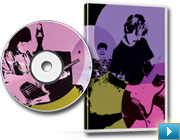
Do more with individual video frames
Capture a single video frame; add text, graphics, and other enhancements; and then put the frame back in your movie for a fun or dramatic freeze-frame effect. Or use it to create a personalized disc cover for your movie.
View it in action
View example
Create extraordinary photos and tell amazing stories
Adobe Photoshop Elements 7 software combines power and simplicity so you can make ordinary photos extraordinary, tell your stories in personalized creations, and easily find and view all your photos.

Select and apply with a single stroke New
Simultaneously select a specific photo area and apply incredible effects with a single stroke of new Adobe Smart Brush. Improve lighting, add rich textures, and more with eight libraries of over 50 sophisticated effects.

Quickly clean your scene of unwanted elements New
You took five shots of your subject, but pedestrians and cars distract from the scene in every one. Now, see only what you want to see in your photos use new Adobe Photomerge Scene Cleaner to simply brush away any elements that changed positions between photos and create a single perfect composite.
Easily make movies and get incredible results
With Adobe Premiere Elements 7 software, it's easy to make incredible movies. Get started quickly with automated moviemaking options, add knockout visuals and sound, and share your movies everywhere.

Create a polished movie instantly New
Create polished movies with no effort using creative techniques from Hollywood directors. Just choose a theme and new InstantMovie automatically edits together your best clips with coordinated music, titles, effects, and transitions. You can even customize the final result if you wish.
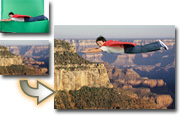
Easily put your subject in a new setting New
Composite video with entertaining results. Use new Adobe Videomerge technology to cleanly extract your moving subject from a solid-color background and then drop it into a new setting for a fun or creative twist.







