|
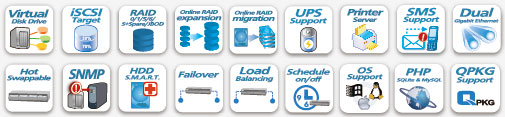
 The 4-bay, 1U rack-mounted TS-410U Turbo NAS is the perfect storage solution with best price performance ratio for SMB and workgroups who need a network attached storage (NAS) server with solid performance, low power consumption, high reliability, and excellent overall value. The Turbo NAS can be easily installed in the server room with rack slide rail kit and efficiently managed by IT personnel over the local network or the Internet. The Turbo NAS is more than a simple networked storage server. It is capable of being a stand-alone download server, centralized network backup, website hosting, network surveillance, and much more. The 4-bay, 1U rack-mounted TS-410U Turbo NAS is the perfect storage solution with best price performance ratio for SMB and workgroups who need a network attached storage (NAS) server with solid performance, low power consumption, high reliability, and excellent overall value. The Turbo NAS can be easily installed in the server room with rack slide rail kit and efficiently managed by IT personnel over the local network or the Internet. The Turbo NAS is more than a simple networked storage server. It is capable of being a stand-alone download server, centralized network backup, website hosting, network surveillance, and much more.
The Turbo NAS incorporates a Marvell 800MHz CPU and 512MB DDRII memory. It supports 4 2.5-inch and 3.5-inch hot-swappable SATA hard drives (optional purchase) and provides 4 USB ports and 2 eSATA ports for storage expansion or external data backup. It is also equipped with 2 Gigabit LAN ports for multi-IP settings and port trunking (7 bonding modes). The Turbo NAS supports advanced NAS and iSCSI applications to provide a low-cost, highly flexible and efficient IP SAN solution. Up to 8 iSCSI targets can be created on the NAS for storage expansion and a central backup destination for computers and servers. The powerful built-in virtual disk drive (VDD) function allows the Turbo NAS to connect other iSCSI targets on the network to virtually expand its capacity.
The Turbo NAS supports RAID 0/ 1/ 5/ 6/ 5+spare, single and JBOD disk configurations. The unique Online RAID Capacity Expansion and Online RAID Level Migration features allow the administrator to expand the storage capacity of the RAID configuration and upgrade the RAID level without turning off the server. A built-in RAID recovery feature is offered to secure the server data against accidental removal of the hard drives.
The Turbo NAS is designed to work with Windows, Mac, Linux, and UNIX networks. Other advanced features include Windows Active Directory (AD), real-time system monitoring, detailed event logs, Simple Network Management Protocol (SNMP), instant SMS alerts, and scheduled power on/ off, etc.
Benefits of Dual Gigabit LAN Deployment
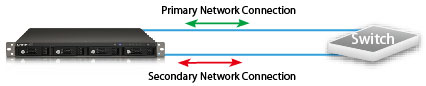
Failover
The dual LAN ports can be configured as failover which allows the NAS server to sustain the failure of one network port to provide continuous services.
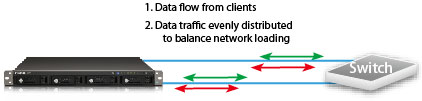
Load Balancing
The two LAN ports of the NAS can be configured as load balancing mode for bandwidth aggregation to boost the file transfer speed (works with managed Ethernet switch with 802.3ad configured).
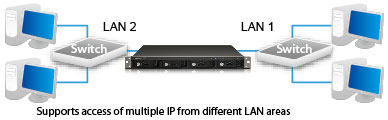
Multi-IP Setting
The TS-410U can be deployed with two IP settings for sharing among different workgroups in two different subnets.
Advanced RAID Management with Hot-swap Design
The NAS offers advanced RAID 0, 1, 5, 6, 5 + hot spare, Single, and JBOD disk configurations. It also supports hot-swap design that a failed drive can be replaced by hot swapping without turning off the server. Besides, the best-in-class RAID on the NAS brings users a higher level of data security by allowing one more hard drive failure than other NAS of the same level.
Online RAID Capacity Expansion
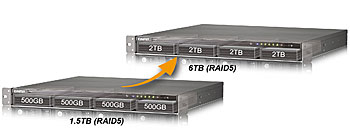
The storage capacity of a RAID configuration can be expanded by replacing the hard drives with larger ones. All the data will be kept and seamlessly moved to the newly installed hard drives. There is no need to turn off the server during the process.
Online RAID Level Migration
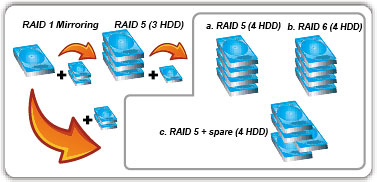
You can upgrade the disk configuration to higher RAID level with the data retained. There is no need to turn off the server during the process.
Virtual Disk Drive (VDD) adds flexibility to storage expansion along with ease of management
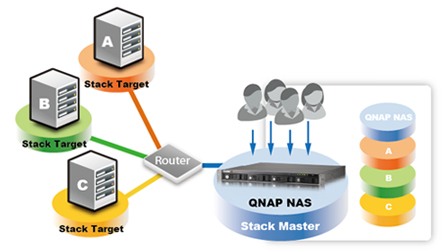
The unique "Virtual Disk Drive" adds flexibility to expand the capacity of NAS. By using the built-in iSCSI initiator, the NAS can connect to other iSCSI targets on the network and turn them into virtual disks, which become multiple single volumes on the NAS. Up to 8 virtual disks can be stacked. The NAS serves as the storage stack chaining master. The user only needs to connect to this single entry (QNAP NAS) and is able to reach and use all the iSCSI target storages on the network.
Flexible Built-in iSCSI Target Service
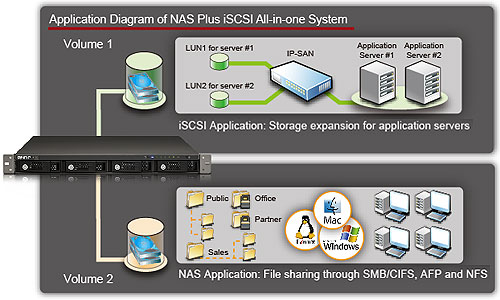
With the built-in iSCSI target feature, the NAS can be an ideal solution for backup or storage expansion. Small business and SMB users can easily create dedicated virtual drives (up to 8 iSCSI devices) on the NAS for their PCs or existing servers. The iSCSI drives on the NAS can be formatted as file system and used as local drives.
S.M.A.R.T & Advanced HDD Health Scanning (HHS)
The NAS supports Hard Disk Drive S.M.A.R.T (Self-Monitoring Analysis and Reporting Technology) for monitoring the hard drive status. Moreover, the NAS is embedded with HHS Technology which supports disk checking and bad blocks scanning.
Complete Backup Solution
QNAP Backup Software - NetBak Replicator
The backup software, NetBak Replicator, is provided for the NAS users to perform real-time synchronization or schedule backup from multiple PCs to the NAS.
3rd Party Backup Software Ready
The NAS works well with other backup software, e.g. Acronis True Image, CA BrightStor ARCserve Backup, EMC Retrospect, Symantec Backup Exec, and LaCie Silverkeeper.
Encrypted Remote Replication
The data on the NAS can be backed up to or from another Turbo NAS over the network securely.
One Touch USB Auto Copy
The one touch button can be configured to trigger instant data backup from the external USB device to the NAS or the other way round (applies to the USB device connected to the front USB port of the NAS only).
High Manageability NAS for Business
Sharing Files across Windows, Mac, Linux, and UNIX
The NAS is designed for users to share the files across Windows, Mac, Linux, and UNIX environment.
Support Windows AD
The Windows AD feature enables server manager to import user accounts from AD domain to NAS to reduce the time and effort for account setup, and users can use the same set of login name and password.
Web File Manager
The NAS provides Web File Manager for you to easily download, upload, and manage the files on the server by web browser.
Ease of User and Share Folder Management
The NAS supports batch creation of users and share folders to save the time and effort of the server manager in account and folder creation. For the security of Windows network environment, server managers can hide or show network share folders.
Power Management
Hard Disk Standby
You can configure the hard disks to enter standby mode if there is no disk access within the specified period.
Schedule Power on/ off
The flexible schedule power on/off feature is now provided on the NAS for IT administrators to manage the NAS server's up time according to the working hours. You can set the time for automatic system power on, power off, or restart on any days of the week.
UPS Support
The TS-410U supports the majority of USB UPS devices which enables the users to store the data in time and avoid critical data loss when power outage occurs during data transfer. It also supports advanced stand-by mode setting that you can set the time for the server to enter standby mode when an abnormal AC power supply is detected. When the power resumes, the server resumes to the operation status before the power outage.
Auto Power on After Power Loss
You can configure the NAS to turn on/ off when the AC power resumes after a power loss.
Secure data storage, access, and sharing
- Comprehensive event logs: Detailed logs of file-level data access to the NAS via samba, FTP, AFP, HTTP, HTTPS, Telnet, and SSH, and networking services accessed by online users are all recorded.
- SSL security (HTTPS): The NAS can be accessed and configured by web browser securely.
- Remote login to the NAS by SSH (secure shell) or Telnet connection is supported.
- Secure FTP: The data can be transmitted with SSL/TLS (explicit) encryption. Passive FTP port range setup is also supported.
- Write-only access right on FTP server: The third party partners are allowed to upload data to the NAS but not able to read or edit the data on FTP server.
Policy-based Automatic IP Blocking
To prevent the NAS from malicious attacks, the server manager can create an IP filter policy to allow, deny, or auto-block the IP address or network domain which attempts to connect to the NAS via SSH/ Telnet/ HTTP(S)/ FTP/ samba/ AFP.
Powerful System Management Tools
Smart Fan
The fan rotation speed is automatically adjusted according to the server's temperature. You can also define the system temperatures to trigger high speed or low speed rotation of the fan. By manually setting the fan rotation speed, the fan will rotate at the defined speed continuously.
Instant SMS/ Email Alert
You can configure the SMTP server and SMSC server settings on the NAS in order to receive instant system warning or error messages by email or SMS.
SNMP (Simple Network Management Protocol)
Simple Network Management Protocol (SNMP) is widely used in network management systems to monitor network attached devices (e.g. NAS). You can set up SNMP trap for alerting via SNMP and there can be up to 3 SNMP trap addresses. Besides, you can also choose the system event log level in SNMP.
SSL Secure Certificate
The administrator can upload a secure certificate and an RSA private key in X.509PEM format issued by a trusted provider in order to allow the users to access the NAS by secure SSL login.
Syslog Settings
All the system event logs and connection logs can be saved to a remote syslog server.
Network Recycle Bin
The files deleted from the network shares of the NAS will be moved to a particular recycle bin folder. You can restore your data anytime in case of unintended file deletion.
Comprehensive Event Log System
The logs of connections to the NAS via samba, FTP, AFP, HTTP, HTTPS, Telnet, and SSH, and networking services accessed by online users are all recorded.
Detailed System Information
You can view the system status, e.g., CPU usage, total memory, free memory, packets received, packets sent, error packets, system up time, CPU temperature, system temperature, HDD temperature, and system fan speed.
Hardware Expandability
The TS-410U supports 4 USB 2.0 ports and 2 eSATA ports. You can connect the external storage devices to the NAS for server data backup or expanding the storage capacity of the server.
 Surveillance Station Surveillance Station
The Surveillance Station enables users to configure and connect 4 IP cameras simultaneously and remotely manage the functions, including real time monitoring, recording, and playback by IE browser over the Internet. Users can flexibly define the recording settings: continuous recording, motion-detection recording, and schedule recording according to their security plan. All the files are stored in AVI format with time stamp, users can easily search and play the files by Windows Media Player.
The most comprehensive support for numerous brands of IP cameras
The Surveillance Station of QNAP NAS supports all the leading network camera brands such as AXIS, D-Link, IPUX, LevelOne, Linksys, Panasonic and Vivotek etc. By using particular models, users can use two-way video and audio monitoring and recording, and smart PTZ control to control the monitoring direction via the web interface. Each of the supported cameras has been put through stringent tests with the NAS series in QNAP's laboratory to guarantee 100% compatibility and reliability with all these camera brands.
Software Expansion and Website Management
Web Server with Built-in phpMyAdmin
With the built-in phpMyAdmin, Joomla!, editable php.ini, MySQL and SQLite, you can easily set up your web server and other online applications such as online shops and forums.
MySQL Server
The NAS is the most affordable choice as a standalone database server for system integrators. It can be flexibly applied in various deployments such as a database server of another web server in remote site or as an additional backup database server.
Built-in DDNS support
The NAS supports dynamic DNS (DDNS). You can register a unique domain name from a DDNS service provider and assign it to your NAS. There is no more need to remember a lengthy IP address!
Software expansion via QPKG Center
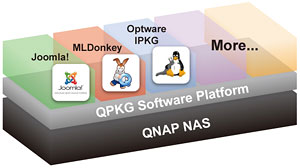
The QPKG software package platform enables you to maximize the usage of the NAS by installing additional software packages developed by the users and community worldwide. This can be done by simple "download & install" clicking without going through any complicated process.
|







